
The fastest AI tool to deploy can become the hardest to fit into your actual workflow. The decision in custom AI versus off the shelf tools isn’t simply whether to buy or build. It’s whether to adapt your process to a generic tool or design around the exceptions, data, and systems your team already relies on.
Starting with an off-the-shelf tool can help you test an idea before committing to a custom build. But a successful demo doesn’t show whether the tool can handle messy documents, reconciliation rules, or the less common cases that keep work moving. A custom system may fit those needs more closely. To keep the work well-defined, agree on integration, testing, deliverables, and code ownership before development begins.
This guide offers a practical framework for choosing based on workflow fit, data handling, integration needs, and long-term ownership. You’ll see when an existing tool is enough, when a custom AI layer makes sense, and how a hybrid or staged approach can limit commitment. It also explains what to define for delivery and testing, using document extraction, spreadsheet reconciliation, and legacy processes as examples.
Key Takeaways
- Choose based on how well an approach fits the workflow, not whether it is custom or off the shelf.
- Use the custom AI versus off the shelf tools framework to weigh process fit, integration, control, adaptability, and internal effort.
- Define the workflow and baseline first, then test fit against a narrow measure of success before committing.
- A staged or hybrid approach can help reduce commitment while you learn what the workflow actually requires.
- For tailored implementation, clear project scope, testing, integration, deliverables, and code ownership help set practical boundaries.
Custom AI versus off-the-shelf tools: what is the real choice?
The real decision is whether to fit an existing tool to your workflow or build software around the workflow. Off-the-shelf AI is a ready-made product designed to serve recurring use cases across multiple customers. Custom AI is software configured or built for a particular business process and the systems it depends on. Neither approach is automatically better. The right fit depends on how closely your work matches the tool’s assumptions.
“Custom” describes the solution’s design and delivery, not necessarily the underlying model. A tailored system might use an existing AI model and add workflow rules, integrations, and review steps around it. It doesn’t automatically require training a model from scratch. AI includes different methods and subfields, as outlined in this Artificial Intelligence Overview. The method and the choice between a ready-made or tailored solution are separate decisions.
What counts as an off-the-shelf AI tool?
A vendor supplies an off-the-shelf product as a standard offering for many customers. Users may configure settings, templates, prompts, or approval steps, but those changes work within the product’s existing design. They don’t usually change its core software or make every business rule part of the product.
For example, a document tool might extract common fields from incoming invoices and send results for review. That can suit a workflow with consistent document formats and straightforward checks. If departments use different fields, exceptions, or approval rules, configuration may not cover every step. Map which cases the product handles and where staff must still intervene.
What makes an AI solution custom?
A custom solution is shaped around specific workflow logic and the systems involved. It may connect document extraction to existing records, apply business-specific validation, route exceptions to the right review step, or reconcile spreadsheet entries against another system. These details determine how well the solution fits the operation, not simply whether it uses AI.
Model selection and software design depend on the use case. A process may need AI to interpret variable documents, conventional code to apply fixed rules, or both. Tailoring can involve configuring an existing model, building an integration layer, or developing additional software. The aim is to address a defined process gap, not to make every component custom by default.
A quick comparison helps clarify the trade-offs:
- Speed to start: Off-the-shelf tools are often quicker to trial; tailored solutions require design and implementation work.
- Process fit: Standard tools suit recurring tasks; custom logic can account for business-specific steps and exceptions.
- Control: A vendor manages the core product and its updates; a tailored system can provide more influence over workflow behavior.
- Ownership: Product access and use depend on vendor terms; code ownership for custom work should be explicitly defined in the project scope.
In the custom AI versus off the shelf tools decision, compare the whole operating arrangement, not just the interface. A ready-made tool may solve the main task while leaving exceptions to staff. A tailored system may address those exceptions, but also requires planning for integration, testing, and ongoing operation. Assess whether your workflow is standard enough to fit a product or specific enough to warrant a designed solution.
Which AI approach fits your workflow, data, and systems?
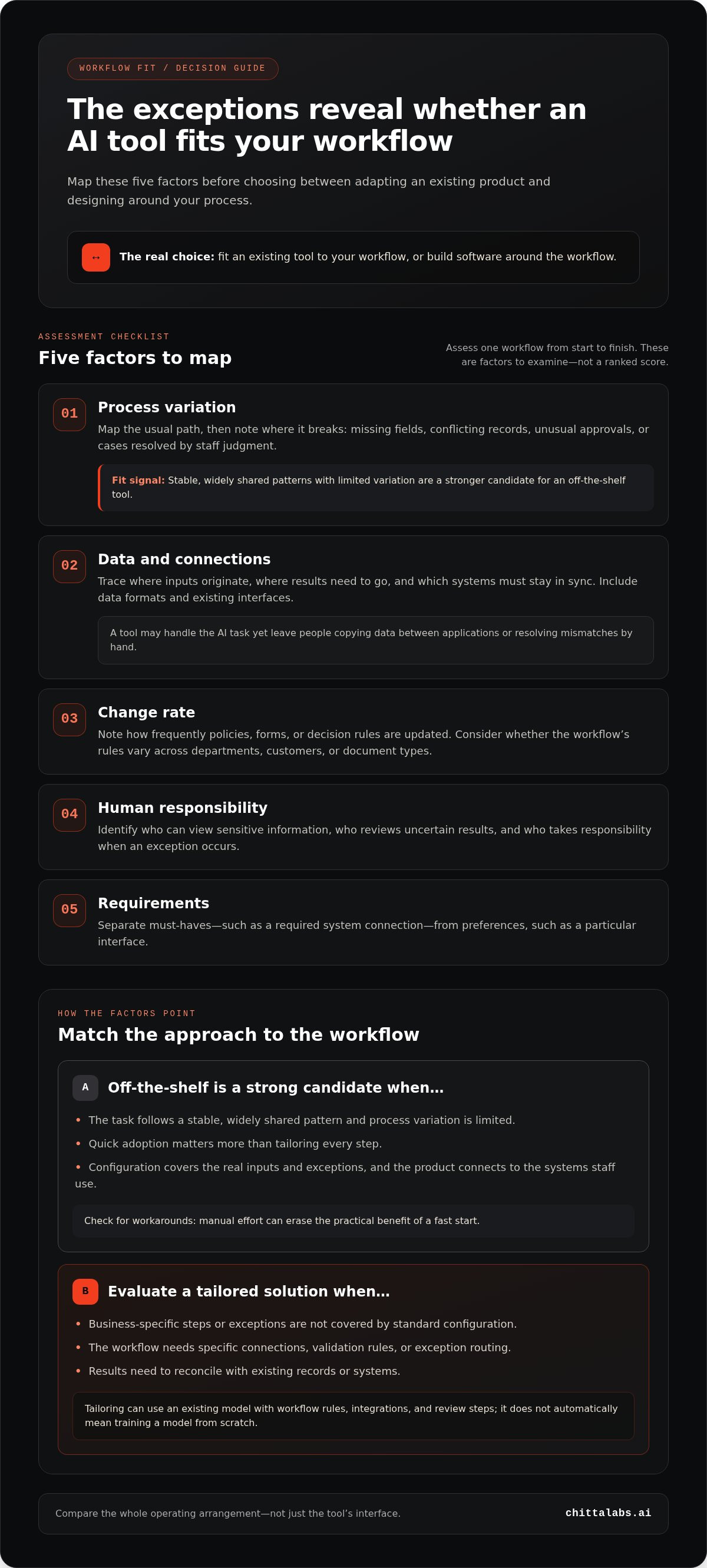
Assess one workflow from start to finish before comparing solutions. Map the usual path, then list the exceptions: missing fields, conflicting records, unusual approvals, and cases that staff resolve by judgment. A process may look standard at a high level but still depend on rules that vary by department, customer, or document type. Those exceptions often determine whether a ready-made tool fits or creates more manual work.
Check the system path as carefully as the task itself. Identify where inputs originate, where results need to go, and which systems must stay in sync. A tool may handle the AI step well yet leave staff copying data between applications or resolving mismatches by hand. Include access and oversight: who can view sensitive information, review uncertain results, and take responsibility when the workflow produces an exception?
- Process variation: Record how often rules differ and what happens when the normal path fails.
- Data and connections: Map required inputs, formats, destinations, and existing system interfaces.
- Change rate: Note how frequently policies, forms, or decision rules are updated.
- Human responsibility: Identify who reviews outputs and owns unresolved cases.
- Requirements: Separate must-haves, such as a required system connection, from preferences, such as a particular interface.
When does an off-the-shelf tool make sense?
An off-the-shelf tool is a strong candidate when the task follows a stable, widely shared pattern and process variation is limited. If the work isn’t a source of competitive difference, quick adoption may matter more than tailoring every step. Check whether configuration covers the real inputs and exceptions, and whether the product connects to the systems staff use. Manual workarounds can erase the practical benefit of a fast start.
When does custom AI become worth evaluating?
Evaluate custom work when a workflow depends on distinctive rules, multiple systems, or repeated manual handoffs that affect operations. For example, document extraction may need to apply different validation rules before data reaches an internal system. Reconciliation may need to distinguish acceptable timing differences from genuine mismatches. If staff repeatedly handle exceptions, measure that work and define the operational outcome a tailored solution should improve.
The comparison is not always a strict either-or choice. A standard tool may handle the predictable portion while a custom layer addresses a specific integration or exception path. Identify which steps the existing product handles, where staff still intervene, and whether those interventions are acceptable. The goal is not to customize by default. It’s to choose the least complex approach that meets essential workflow requirements.
This is the practical test behind custom AI versus off the shelf tools: does the workflow fit the product, or does the product leave important work outside its boundaries? Chitta Labs builds enterprise workflow automation for specific process and system needs, including document extraction, spreadsheet reconciliation, and legacy process automation. Explore enterprise workflow automation.
Compare control, integration, and total effort, not just the tool
A product’s setup effort is only one part of the decision. Compare the work required to configure it, connect it to your systems, review its outputs, handle exceptions, and keep the process running as requirements change. An off-the-shelf tool shifts responsibility for the core product and its updates to the vendor. A tailored solution can offer more control over workflow behavior, but your organization must plan for its operation, maintenance, and future changes.
| Factor | Off-the-shelf tool | Custom solution |
|---|---|---|
| Process fit | Works well when the workflow matches supported patterns; exceptions may need manual handling. | Workflow logic can be designed around specific rules and exception paths. |
| Integration | Connections depend on available product capabilities and configuration. | Integration can be included in the design, with scope defined for the systems involved. |
| Control | The vendor manages the product and its core updates. | Control depends on the solution design, project scope, and agreed code ownership. |
| Adaptability | Changes must fit the product’s settings and release path. | Changes can be made to tailored software, but require planned maintenance or further work. |
| Internal effort | Teams configure the tool, manage workarounds, review outputs, and handle exceptions. | Teams define requirements and support operation, testing, and changes after delivery. |
How do integration and data control change the decision?
Trace the data before choosing. Identify what enters the workflow, where it is processed, which systems receive the result, and who can access each step. Consider data formats, permissions, retention needs, and how outputs are reviewed. These details shape technical design and should be considered alongside vendor terms and internal policies.
Privacy and compliance aren’t determined by the tool label alone. They depend on the data involved, contractual terms, system architecture, and the jurisdictions relevant to the business. Map technical requirements separately from legal review. Neither a vendor-managed product nor a custom build is automatically compliant.
How should teams compare effort over time?
Compare the work that recurs, not just the work required to launch. A ready-made tool may need less initial software work but still require staff to reformat inputs or review exceptions. A tailored system may reduce those workarounds, while requiring ongoing ownership of maintenance and changes. The balance depends on workflow volume, exception frequency, integration needs, and how often rules change.
| Scenario | Off-the-shelf effort to examine | Custom effort to examine |
|---|---|---|
| Stable task with few exceptions | Configuration, output review, and any manual steps the product leaves behind. | Design and integration effort compared with the limited workflow need. |
| Multiple systems and frequent rule changes | Workarounds, exception review, and limits on configuration. | Defined build scope, testing, maintenance, and future change requests. |
For a useful comparison, estimate internal hours across setup, configuration, integration, review, and ongoing operation for each scenario. This makes custom AI versus off the shelf tools a workflow-specific decision, not a generic price or break-even calculation.
Use a staged decision process to reduce the risk of choosing
Make the decision against evidence from one real workflow, not a product demo or a broad AI ambition. A short, structured assessment can reveal whether an existing tool fits, where it falls short, and whether a tailored component is worth scoping. Set a narrow success measure before testing, such as fewer manual handoffs or less time spent reviewing routine cases. Tie the measure to the process your team needs to improve.
- Define the workflow. Document the start point, key steps, decision rules, exceptions, systems, and people involved. Include the cases that routinely leave the standard path.
- Measure the baseline. Record how the process works now. Track the measure you chose, plus review effort, manual handoffs, and how staff resolve exceptions. This gives the test a useful point of comparison.
- Test fit. Use a limited set of representative cases with an existing tool or configuration. Include ordinary inputs and meaningful exceptions. Note output quality, staff review, failure handling, and any integration gaps.
- Choose a path. Compare the results with your success measure and essential requirements. Decide whether to continue with the tool, adjust the process, test a hybrid approach, or define a specific gap for custom work.
How can a team test fit before committing?
Choose examples that reflect the real range of inputs, not only clean, predictable cases. For document workflows, include variations in format and completeness. For reconciliation, include both matches and the types of discrepancies staff need to resolve. Log incorrect or uncertain outputs, time spent reviewing them, and what happens when the tool cannot complete a step. Record every manual workaround and system connection that remains necessary.
Keep the test bounded. The goal is to learn whether the approach fits the workflow, not to prove that AI can perform the task in ideal conditions. Use the same success measure as the current process, then review results with the people who handle routine work and exceptions. Their feedback can reveal day-to-day friction that a single metric misses.
When is a hybrid approach a practical bridge?
A hybrid approach can use an existing tool for standard cases and tailored logic for a defined gap, such as a system connection or a business-specific exception. Treat this as an option to test, not as a guaranteed way to lower risk. Set evidence-based criteria for each component: retain it if it meets the process measure, expand it if new cases are handled reliably, or replace it if workarounds persist.
Set a decision gate before the test begins. Continue when the tool meets essential requirements and the measured process improves without creating unacceptable review work. Change the configuration or process when the gap is specific and manageable. Scope custom work when an important requirement remains unmet and the operational outcome justifies addressing it. If the result is inconclusive, refine the test rather than expanding by default.
For a workflow with persistent integration or exception-handling gaps, plan a fixed-scope custom AI project around the process, deliverables, and boundaries your test has identified.
What a custom AI project with Chitta Labs should deliver
Once you’ve identified a workflow that needs tailored implementation, make the work concrete. Chitta Labs delivers enterprise AI and automation through fixed-scope projects. A clear scope connects the operational problem to defined requirements, integration work, testing, and deliverables. It also sets boundaries, so the project addresses a specific workflow gap rather than expanding into an open-ended AI initiative.
How does fixed-scope delivery make the work concrete?
Start with the work the system needs to perform and the conditions it must handle. For document extraction, define the fields to capture and the exception paths that need review. For reconciliation, specify how records should be compared and what counts as a discrepancy. For a legacy process, map the current steps and the systems involved. These details turn an operational need into agreed project work.
A useful scope should make clear:
- Requirements: The workflow steps, business rules, inputs, outputs, and exceptions the solution must address.
- Integration: The systems involved and how information needs to move between them.
- Testing: The expected test cases, including ordinary scenarios and exceptions, and how results will be assessed.
- Deliverables and boundaries: What the project includes, what it does not include, and how changes to the agreed scope will be handled.
System integration and robust testing are part of Chitta Labs’ enterprise work. Testing should reflect the defined workflow, not only a successful example. Include how the system handles incomplete inputs, mismatches, or cases that need human review. The test plan should follow the process and agreed requirements.
What belongs in a useful project brief?
Give the project team a clear picture of the process today and the result you need. Record the systems, inputs, outputs, rules, and exceptions. State how your team will evaluate the outcome, such as tracking manual handoffs or reviewing exception handling. Include expected integration points, testing needs, handover requirements, and ownership expectations. A focused brief makes decisions easier to document and keeps the project tied to the workflow.
Define code ownership precisely. Chitta Labs provides complete code ownership for its project work. Identify any third-party components separately, since their terms and ownership remain distinct. Agree on the documentation and handover materials your team needs to understand and maintain the delivered work.
The comparison between custom AI versus off the shelf tools should lead to a practical next step: a defined workflow, clear requirements, and a measurable operational goal. If your assessment points to tailored implementation, discuss your workflow and project scope with Chitta Labs.
Turn your workflow findings into a clear next step
The choice between custom AI versus off the shelf tools doesn’t need to become a permanent commitment made all at once. Treat it as a decision you can revisit as your workflow, systems, and requirements change. Name the specific gap that still affects the work, then decide whether to adjust the process, continue with the current tool, or define a tailored project around that gap.
Bring the people who handle the process into that decision. Their day-to-day experience can help distinguish a genuine operational need from a preference for new technology. Keep the goal clear, the scope bounded, and the expected result practical. That gives your team a sound basis for moving forward without building more than the workflow requires.
If your assessment points to a defined implementation need, start a project conversation with Chitta Labs. Share the workflow, the gap you need to address, and the outcome you want to measure.
Frequently Asked Questions
Is custom AI always a model trained from scratch?
No. Custom describes how a solution is adapted to a business process, not necessarily how its underlying model was created. A project can use an existing model and add rules for classifying records, routing unusual cases, or validating fields. Training a model from scratch is a separate technical choice, considered only if the task, available data, and performance requirements justify it.
Can a business use an existing large language model in a custom AI solution?
Yes. An existing large language model can serve as one component of a tailored system, with software connecting it to a specific task or business application. In the custom AI versus off the shelf tools decision, the model itself is only part of the picture. Data policies, output checks, system connections, and the consequences of errors also shape the architecture. Test those factors for the intended workflow.
How much data does a company need before considering custom AI?
There’s no universal data-volume threshold for a custom AI project. First identify what the system must do and whether current inputs are complete, consistent, and representative of real cases. A team may need sample documents to evaluate field extraction, for example, while a rules-based process may rely on structured records. Start with the evidence needed to test the design, then address gaps in data quality or coverage.
What happens if an off-the-shelf AI tool changes or is discontinued?
The impact depends on how much of your operation relies on the tool and how easily its role can be replaced. Document the data it receives, the outputs other systems depend on, and any workflow steps built around it. Check what information can be exported and define a fallback for business-critical tasks. These are sensible continuity measures for any software dependency, not evidence that standard tools are inherently unreliable.
Do employees need machine-learning expertise to use custom AI?
Not necessarily. Business users generally need to understand the process, review outputs where required, and follow the agreed steps for exceptions. Technical specialists handle the system’s design, integration, testing, and maintenance. Before launch, assign responsibility for business decisions, output review, and technical changes. For example, specify who can approve a result that doesn’t match the expected format, rather than leaving that decision to individual users.
Can a custom AI project begin with one business process?
Yes. A project can focus on one bounded task, such as extracting selected fields from a defined set of documents. Specify which inputs are in scope, what the process should produce, and how unusual cases will be handled. Also decide what evidence will indicate that the solution meets its purpose. A focused brief helps teams assess the work clearly without assuming that a narrow project guarantees success or a particular delivery schedule.
