
A powerful AI model won’t make a disconnected workflow reliable. AI automation for enterprises works when AI is placed inside a controlled process: software rules handle predictable steps, while people review decisions that need judgment.
This matters when manual work crosses teams and systems, but the path from AI capability to operational improvement is unclear. Automation isn’t a plug-in fix. It needs to fit the workflow, connect with the systems people already use, and make ownership and review points explicit.
This article explains where AI can add value in an enterprise workflow and how it can work alongside rules-based software and human review. You’ll see how document extraction, system reconciliation, and legacy process automation can address practical bottlenecks. You’ll also learn how to define a contained project with clear requirements, delivery boundaries, and evaluation criteria. The goal is a useful implementation that can be tested against real operational needs, not an open-ended AI initiative.
Key Takeaways
- AI automation for enterprises is most useful when it improves a defined workflow, not when it is added as a standalone tool.
- Map how information moves from its source to a decision and downstream action to find where automation can reduce friction.
- Use AI for variable inputs that need interpretation, and reserve predictable steps for rules or human judgment.
- Choose a contained process and establish baseline measures such as handling time, error rates, or manual touches.
- Custom automation can connect document extraction, reconciliation, and legacy processes to the systems your enterprise already relies on.
What AI automation for enterprises changes in a real workflow
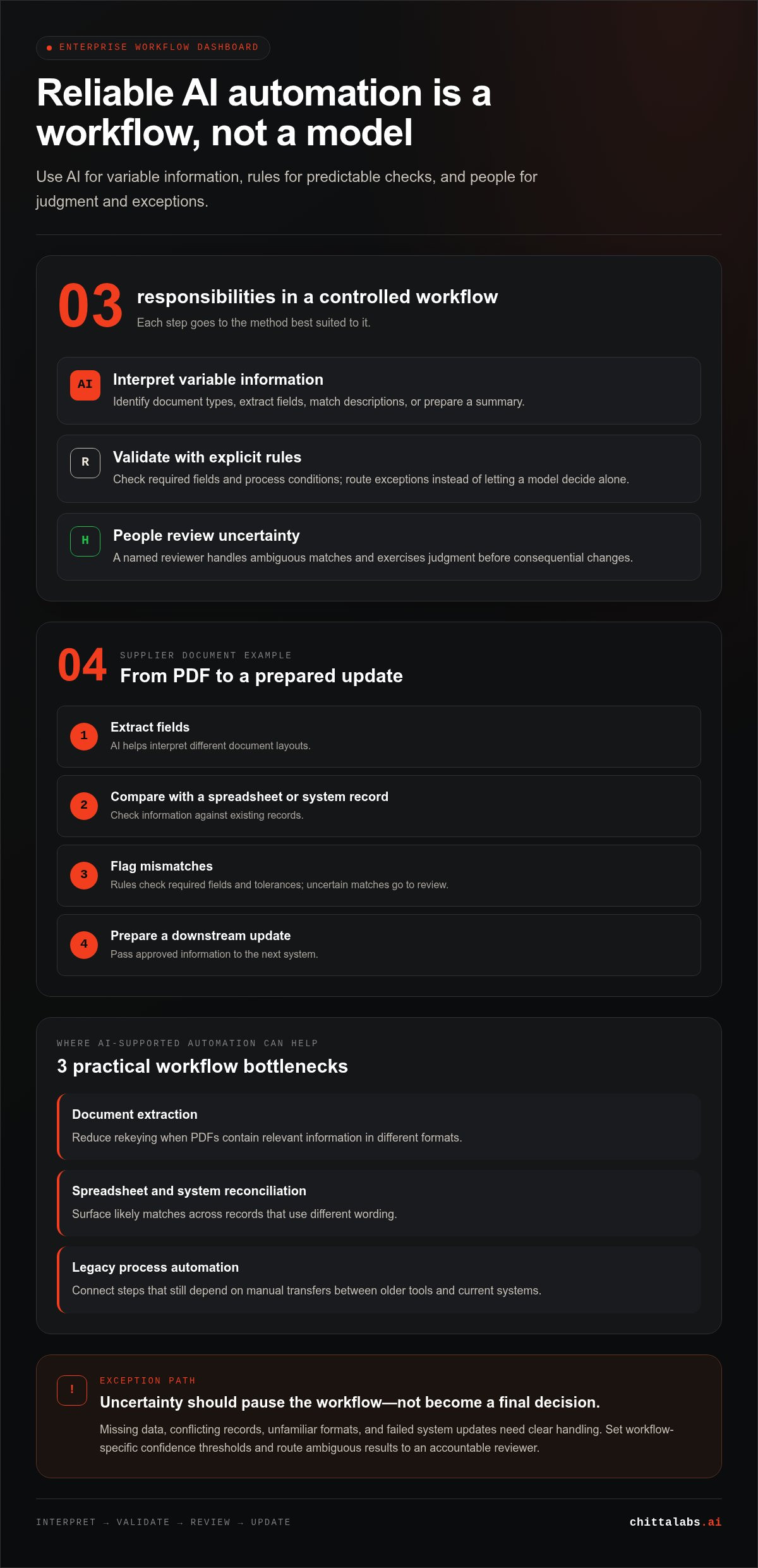
Enterprise AI automation coordinates a sequence of business steps rather than applying a model to an isolated task. It uses software to coordinate a workflow, AI to interpret variable information and support decisions or actions, and people to review exceptions and exercise judgment. That is the practical purpose of AI automation for enterprises: helping work move reliably between inputs, decisions, and systems.
Consider a supplier document that arrives as a PDF. A workflow might extract its fields, compare them with a spreadsheet or system record, flag mismatches, and prepare a downstream update. AI can help interpret different layouts or descriptions. Rules can check required fields and tolerances. An employee can review uncertain matches before a consequential change is made. The goal isn’t to make every step autonomous. It’s to assign each step to the method best suited to it.
This is the difference between automating a task and redesigning the workflow around it. Extracting text faster may save effort at one point, but it won’t resolve duplicate entry, unclear approvals, or mismatched data later in the process. Workflow design makes handoffs visible and defines what happens when information is missing, inconsistent, or outside expected conditions.
How AI automation differs from traditional process automation
Traditional automation works well when conditions are known and actions are repeatable. A rule can route a record based on a field value. Robotic process automation (RPA) can execute defined steps in a user interface, such as copying approved information between systems. These methods are dependable when the process and inputs follow stable patterns.
AI supports steps that require interpretation, such as identifying a document type or matching descriptions that vary in wording. It can suggest a classification or match, but that output shouldn’t automatically become the workflow’s instruction. Rules can validate it, set confidence thresholds, or route exceptions to a person. This combination reflects Intelligent Automation, where AI and RPA contribute different capabilities. Enterprise workflows often need both, rather than replacing established rules with a model.
Which enterprise work benefits from AI-supported automation
Look for repeatable work with variable inputs or manual handoffs. Document extraction can reduce rekeying when PDFs contain relevant information in different formats. Spreadsheet and system reconciliation can surface likely matches across records that don’t use identical wording. Legacy process automation can connect steps that still depend on manual transfers between older tools and current systems.
AI is most useful when a person currently reads, interprets, or compares information before deciding what happens next. It can prepare a result for review, while deterministic rules handle clear conditions and people resolve ambiguous cases. Exceptions still matter: poor source data, unfamiliar formats, or conflicting records may require human judgment. Designing for those cases makes the workflow easier to control and evaluate.
How enterprise AI automation connects data, decisions, and systems
Automation becomes useful when information can move from its source to an approved action. Take an incoming service request: the process might capture the message, identify its purpose, match it to an account, check required information, and create or update a case in a business system. Each stage has a defined input and output. That makes it easier to see where interpretation happens and where a rule or person must take responsibility.
AI outputs become controlled business actions when workflow rules validate the result, route uncertainty to an accountable reviewer, and pass only approved information to the next system. This separation matters. A model can suggest a category or summarize a request, but it shouldn’t decide on its own that a record is complete, eligible, or ready for an irreversible change. AI automation for enterprises depends on the full process, including the checks and handoffs around the model.
Integration is part of that process, not a feature to bolt on after the AI work. The design must account for where information originates, how the destination system accepts it, and what happens if an update fails. APIs are one way to exchange data; other integration methods may suit systems with different capabilities. In either case, the workflow should preserve enough context for a person to understand what was proposed and what happened next.
Where models, business rules, and APIs fit
Give each component a bounded role. A model can classify a request, extract key fields, match similar descriptions, or prepare a summary. Explicit rules can check that required fields are present, confirm that a value meets a process condition, and determine whether the workflow may proceed. An API or another integration method can then pass approved information to a case-management or finance system. The model interprets, rules validate, and integration moves data.
How to handle uncertain results and exceptions
Set confidence thresholds for the specific workflow and its risks rather than assuming one score works everywhere. A clear result can continue to rule checks; an ambiguous match can pause for a named reviewer. Missing data, conflicting records, and failed system updates need their own exception paths. Don’t turn uncertainty into a final decision without review.
Where appropriate, keep a record of the input, suggested result, validation outcome, reviewer action, and final system update. That trail helps teams see whether errors cluster around certain request types or data sources. Corrections can inform changes to rules, prompts, or process steps. Testing can then show whether an adjustment improves the workflow without creating new failure points.
For a workflow spanning older tools and current systems, define the data handoffs and exception routes before choosing how each connection will work. This is also the basis for custom enterprise workflow automation, with the AI layer and integration shaped around the process rather than treated as standalone features.
Where enterprise AI automation fits, and where rules or people should lead
Choose an approach by looking at the task’s inputs, decision boundary, and the cost of an incorrect result. A stable process with consistent fields and explicit conditions usually needs rules, not AI. A task that depends on interpreting varied documents or matching inconsistent descriptions may benefit from AI. AI automation for enterprises often combines both: AI interprets, rules constrain the next action, and a person handles cases outside the agreed boundary.
For example, a reconciliation workflow can use AI to suggest that differently worded spreadsheet entries refer to the same transaction. Deterministic rules can check required fields and compare values against defined conditions. Clear matches that pass validation can continue; ambiguous or conflicting records can go to review. The model doesn’t set the acceptance criteria or silently resolve exceptions, so the workflow remains controlled.
| Task characteristics | Suitable approach | Required oversight |
|---|---|---|
| Consistent inputs, explicit conditions, predictable outcomes | Rules-based automation | Test rule coverage and review failures or changed conditions. |
| Variable documents or records that need interpretation | AI-supported classification, extraction, or matching | Validate outputs and route uncertain cases to a reviewer. |
| AI interpretation followed by a defined business action | Combined AI and rules-based workflow | Set decision boundaries, assign an exception owner, and track outcomes. |
When to use AI, rules-based automation, or a combination
Favor rules when the process can be expressed as clear conditions and the same input should produce the same result. Consider AI when meaningful information appears in inconsistent formats or wording. Combine them when AI can interpret or match information but the business action must follow explicit criteria. Keep the model’s role narrow, and test the complete workflow against ordinary cases and known exceptions.
What should remain under human review
Human review is an intentional control, not evidence that automation has failed. Send incomplete records, close competing matches, conflicting source data, and consequential decisions to a designated reviewer. Name the role responsible for resolving exceptions, and define who settles disagreements about process rules. Without clear ownership, a flagged case can become another queue with no path forward.
Set the boundary before deployment: which results can proceed, which require review, and which must stop for resolution. Reviewers need enough context to assess a recommendation, including the source information and the rule or condition that triggered the handoff. Record their decisions and corrections. That feedback can show where inputs, rules, or review guidance need refinement, while preserving human judgment where the workflow calls for it.
How to scope and evaluate an enterprise AI automation project
A practical project starts with a workflow problem, not a model choice. Select a process where the current effort or failure points can be observed, then agree on how to judge the proposed workflow. Project success means meeting agreed acceptance criteria and improving against a measured baseline without losing control of exceptions or review. This gives AI automation for enterprises a clear boundary: a defined process, a testable delivery, and an operational owner.
Set a bounded scope before building
Choose one process with a clear owner, identifiable inputs, a defined output, and a visible operational problem. Map the existing steps, system handoffs, exception types, and review responsibilities. Specify what the first delivery will handle, what it will pass to a person, and which cases remain out of scope. A fixed scope makes requirements and evaluation concrete.
Use this sequence to turn the workflow into a testable project:
- Select the process. Name the accountable owner and state the operational issue the work should address.
- Map the current state. Record each step, handoff, system, exception path, and point of human review.
- Set a baseline. Where records exist, measure handling time, error rates, manual touches, or exception volume. If they don’t, agree on a representative sample and capture current performance before comparing results.
- Define acceptance criteria. Specify what counts as an acceptable extraction, match, routing decision, and review handoff. Define required fields, validation conditions, and what should happen when a case fails a check.
- Agree on the delivery boundary. Document the inputs, outputs, integrations, cases handled, and known exclusions for the first release.
Test the workflow against real operating conditions
A successful demonstration on clean examples isn’t enough. Test the connected process using representative records, including incomplete, unusual, and inconsistent inputs. Check each stage, not just the model response: extraction or interpretation, validation, system handoff, exception routing, and human review.
Compare test results with the baseline and acceptance criteria. Check whether the workflow reduces avoidable handling without increasing incorrect updates or leaving exceptions without an owner. Track unresolved failure modes, such as a recurring document format or a system handoff that needs manual recovery. Record how the workflow handles those cases before deployment. If testing shows a case can’t be handled safely within scope, keep it in the review path rather than stretching the project boundary.
For a contained implementation, Chitta Labs connects explicit requirements with custom automation, integration, and testing. Scope an enterprise workflow automation project around a measurable process, clear acceptance criteria, and defined operational ownership.
How Chitta Labs builds custom AI automation for enterprise workflows
Enterprise automation should fit the process it is meant to improve. Chitta Labs builds custom AI layers and automated software around enterprise workflows rather than treating AI as a standalone feature. Digital consulting helps define process requirements; process automation turns those requirements into working software; full system integration connects the solution to the systems and handoffs the workflow depends on.
This approach keeps delivery grounded in an operational need. The scope identifies what the automation will handle, how it fits into existing work, and where review or exceptions remain necessary. That matters for AI automation for enterprises: a promising model output has limited value unless it can be used safely and consistently within the larger process.
From process requirements to integrated automation
Work begins by translating a defined workflow into requirements for inputs, decisions, outputs, integrations, and review points. Those requirements shape the automation’s boundaries and clarify what the first delivery needs to do. A document extraction workflow, for example, can be designed around the fields and handoffs relevant to the business process, not just the act of reading a PDF.
The same principle applies to spreadsheet and system reconciliation or legacy process automation. The solution must account for how information is handled in the existing process and how it should move between systems. That can mean building an AI layer for an interpretation step while keeping process conditions explicit and connecting approved outputs to downstream software. Integration is part of workflow design, not a feature added at the end.
Chitta Labs delivers this work under fixed-scope contracts. A clear scope ties requirements to implementation, making it easier to identify what the solution covers and what remains outside its intended use.
What delivery and ownership mean for the enterprise
Testing is part of building the workflow, not a final formality. Robust testing checks that the automation meets its requirements, including its system connections and expected process paths. It also helps surface cases that need review or further handling before the solution is handed over.
Complete code ownership gives the enterprise ownership of the code developed for the solution. This is distinct from buying access to a pre-built AI product. The work is shaped around the enterprise process, with the implementation and its requirements tied to the defined scope.
For a practical starting point, identify one workflow with a clear owner, a specific operational issue, and an outcome the team can evaluate. Bring that process, its key handoffs, and its known exceptions to a discussion with Chitta Labs. Discuss your enterprise automation workflow and define a contained next step.
Choose a practical next step for enterprise AI
The next move isn’t to automate everything. Choose a workflow where teams can point to a specific bottleneck and describe what better execution would look like. That gives leaders a grounded way to assess AI automation for enterprises: start with an operational need, define the desired change, and tie the decision to evidence from the work itself.
A focused discussion can turn that need into a project brief. Identify the workflow owner, the systems involved, the constraints that matter, and the result the team will use to evaluate the work. Chitta Labs delivers custom enterprise automation through fixed-scope project contracts, with full system integration, robust testing, and complete code ownership. These are practical foundations for moving from a defined problem to software built around the process.
If your team has a workflow worth improving, discuss an enterprise AI automation project with Chitta Labs. A clear starting point makes the next decision easier and puts progress within reach.
Frequently Asked Questions
Is enterprise AI automation the same as robotic process automation?
No. RPA generally follows predefined interface actions, such as copying a value from one field into another, while AI can interpret content whose wording or layout varies. In AI automation for enterprises, both can contribute to the same workflow: AI may identify a document field, and RPA may enter an approved value into a legacy screen. The better fit depends on input consistency, process controls, exception handling, and the impact of mistakes.
Can AI automate a workflow that has exceptions?
Yes. A workflow can automate common cases while sending incomplete or ambiguous ones to a named reviewer or an alternate process. For example, a record missing a required reference might pause for an operations lead instead of being processed with a guessed value. Define exception categories and ownership during scoping, then test each path with representative examples. This keeps irregular cases visible instead of letting them fail silently.
What happens when an AI system produces an uncertain result?
The workflow can validate the result, apply confidence rules set for that specific task, and route uncertain cases for review. The right response depends on what the system is deciding and the consequences of an error. A reviewer should be able to see why the case was flagged, correct the record, and ensure the correction is reflected downstream. An uncertain model output should remain a proposal, not an automatic final decision.
How much data does an enterprise AI automation project need?
There’s no universal quantity. A project needs examples that reflect routine inputs, meaningful variations, and known exceptions in the process being automated. Before setting evaluation criteria, assess whether the data is accessible, sufficiently complete, and representative of actual work. For instance, a document workflow tested only on one clean template may miss alternate formats. More data alone doesn’t guarantee useful automation; relevance and coverage matter.
Can enterprise AI automation work with existing business systems?
Yes, it can be designed to connect with existing systems when the required data and integration paths are available. Scope the source and destination systems, the permissions required, how information will be validated, and what happens if a transfer fails. For example, a successful update should be distinguishable from a rejected one. Treat each connection as part of project requirements and testing rather than assuming compatibility with every platform.
How long does an enterprise AI automation project take?
Timing varies with workflow complexity, system access, data quality, integration needs, and the range of cases that require testing. A process with clear inputs and a limited handoff differs from one that spans several systems and exception paths. Rather than rely on a generic duration, define the delivery boundary and acceptance criteria first. A bounded scope gives the team a clearer basis for planning and tracking progress.
Can a company automate only one step of an enterprise process?
Yes. A project can focus on one bottleneck, such as extracting selected fields from incoming forms, while leaving approvals and downstream decisions unchanged. Define the step’s inputs, expected output, system handoff, and the person responsible for exceptions. Then assess whether the intervention improves that part of the process without assuming other steps need to change. This creates a contained way to evaluate the value of automation.

